

1. 이론
-
CORS 정의
Cross-Origin Resource Sharing(CORS)은 브라우저에서 다른 도메인, 포트, 프로토콜로부터 리소스를 요청할 때 발생하는 보안 정책입니다.
기본적으로 브라우저는 동일 출처 정책(Same-Origin Policy) 을 적용하여 다른 출처의 리소스를 차단합니다. -
구성 요소
Origin 요청을 보낸 출처 Access-Control-Allow-Origin 허용할 출처 Access-Control-Allow-Methods 허용할 HTTP 메서드(GET, POST 등) Access-Control-Allow-Headers 허용할 커스텀 헤더 Access-Control-Allow-Credentials 인증 정보(Cookie) 포함 여부 -
브라우저 동작
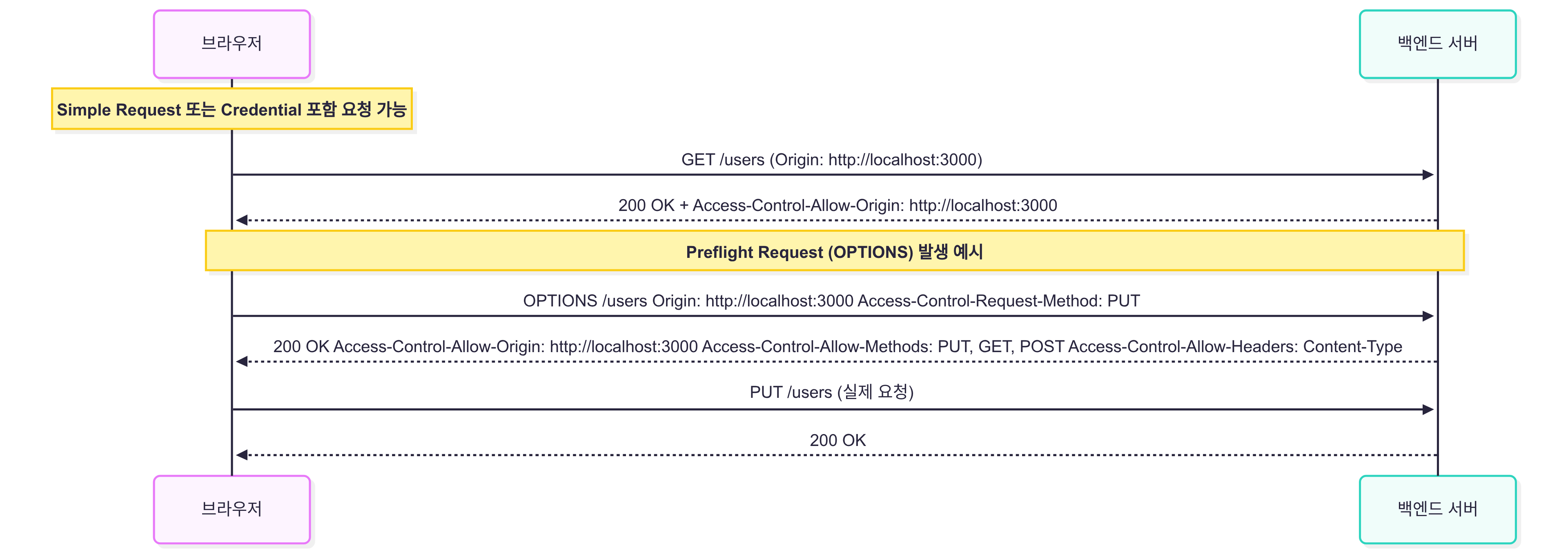
- Simple Request: GET, POST 등 기본 요청 → 서버 응답 확인 후 허용
- Preflight Request: PUT, DELETE, 커스텀 헤더 사용 시 OPTIONS 요청 → 서버 승인 후 실제 요청
2. 활용
- Spring Boot에서 CORS 설정 예제
- Controller 레벨
@RestController
@CrossOrigin(origins = "http://localhost:3000")
public class UserController {
    @GetMapping("/users")
    public List<User> getUsers() {
        return userService.findAll();
    }
}
- Global 설정 (모든 경로)
@Configuration
public class CorsConfig {
    @Bean
    public WebMvcConfigurer corsConfigurer() {
        return new WebMvcConfigurer() {
            @Override
            public void addCorsMappings(CorsRegistry registry) {
                registry.addMapping("/**")
                        .allowedOrigins("http://localhost:3000")
                        .allowedMethods("GET", "POST", "PUT", "DELETE")
                        .allowCredentials(true)
                        .allowedHeaders("*");
            }
        };
    }
}
- 주의
- allowedOrigins("*") + allowCredentials(true) 불가 → 브라우저에서 에러 발생
- 서버에서 인증 관련 헤더를 포함하려면 출처를 명시적으로 지정해야 함
3. 심화
- Preflight(OPTIONS) 요청
- 브라우저가 실제 요청 전 OPTIONS 요청을 보내 서버 허용 여부 확인
- 서버에서 Access-Control-Allow-Methods와 Access-Control-Allow-Headers 응답 필요
- Credential 포함 요청
- Cookie, Authorization 등 인증 정보가 필요한 경우
- allowCredentials(true) + 명시적 allowedOrigins 필요
- Spring Security와 CORS
http.cors().and()
    .csrf().disable();
- Security 필터와 CORS 필터 순서 주의
- Security 설정이 먼저 CORS를 막으면, @CrossOrigin 또는 WebMvcConfigurer 설정이 적용되지 않음
- 도메인 환경에 따른 전략
- 개발: localhost:3000 등 프론트/백엔드 분리
- 운영: 배포 도메인만 허용, 와일드카드 사용 금지
4. 면접 대비 핵심 포인트
- CORS vs Same-Origin Policy 차이 명확히 설명
- Simple vs Preflight Request 차이 이해
- Spring에서 Controller 레벨과 Global 레벨 CORS 설정 차이
- Credential 포함 요청 시 주의 사항
- Spring Security와 CORS 필터 순서 문제
5. 면접 연습
Q1. CORS가 필요한 이유?
A: 브라우저가 다른 출처 요청을 기본적으로 차단(SOP)하기 때문에, 서버가 허용 헤더를 반환해 클라이언트 요청을 허용해야 함.
Q2. Simple Request와 Preflight Request 차이?
A: GET/POST 등 단순 요청 → Simple Request. PUT/DELETE, 커스텀 헤더 포함 → 브라우저가 먼저 OPTIONS 요청 → Preflight Request.
Q3. allowCredentials(true) + "*" 가능한가?
A: 불가. 인증 정보 포함 요청 시 출처를 명시적으로 지정해야 함.
Q4. Spring Security에서 CORS 적용 시 주의점?
A: Security 필터가 CORS를 막으면 `@CrossOrigin` 또는 WebMvcConfigurer 설정이 적용되지 않음. `http.cors()`로 필터 순서 보장 필요.
Q5. Global CORS 설정과 Controller 레벨 설정 차이?
A: Controller 레벨: 특정 컨트롤러/메서드만 허용 Global 레벨: 모든 요청에 대해 공통 허용
6. 마무리
- CORS = 브라우저에서 다른 출처 요청을 안전하게 허용하는 메커니즘
- Spring에서 Controller, Global, Security 레벨에서 모두 설정 가능
- Preflight 요청, Credential 포함, Security 필터 순서 등 실무에서 반드시 주의
- 면접에서는 왜 CORS가 필요한지, Preflight 동작, Spring 설정 방법을 구체적으로 설명 가능해야 함